How To Assign Rewards To Clients (All Or Individual)
How To Assign Rewards to Individual
Although the system can bulk assign a reward package to all your clients, you may sometimes want an individual client to be on a specific / different package.
To do this:
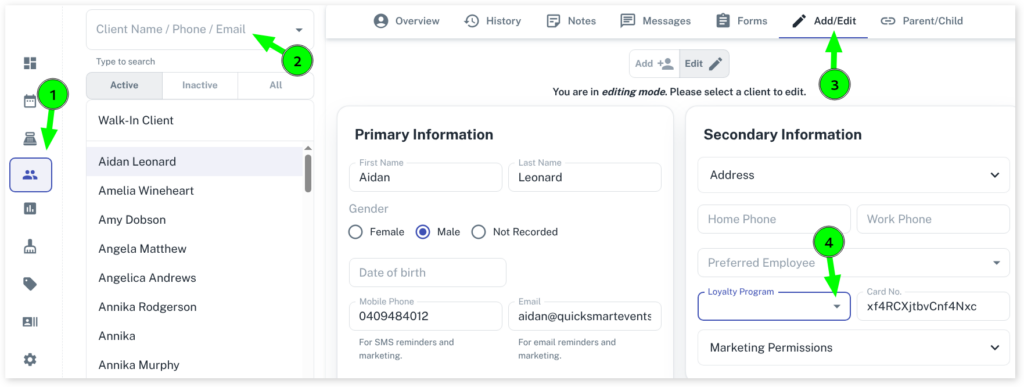
Select the Clients menu
Search for the Client you want to add the rewards to
Press the Add/Edit tab
Scroll down to Loyalty Program and select the reward you want to apply to client in the drop menu
Click on Save to apply changes
How To Assign Rewards to All Clients
The system can bulk assign a reward package to all your clients at the same time. To do this:
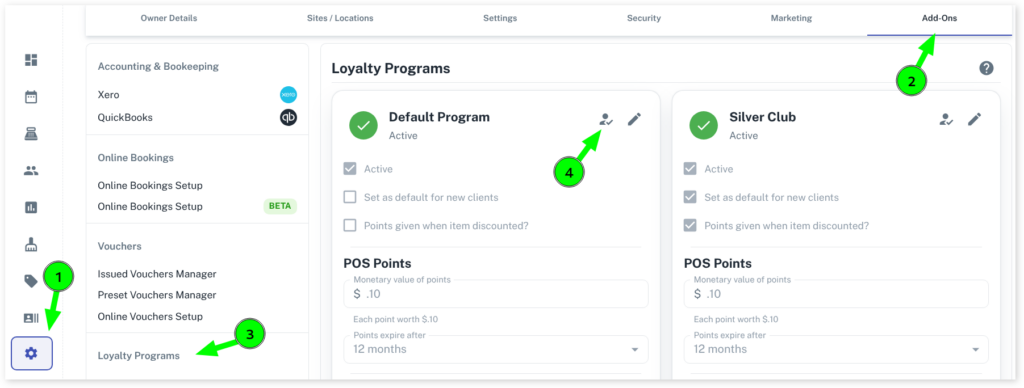
Select the My Account menu
Press the Add-Ons tab
Select the Loyalty Program Settings under Loyalty Programs
Click on next to your rewards heading to assign the reward to all your clients
What Happens When I Move a Client to Another Reward Package?
If you have a client that has existing rewards points and you want to assign them to a different reward point package, then Client Diary will update the value of points to the new rewards package you move them to.