
Getting ready to add staff to your business and wanting to jump to a higher tier or after downsizing and wanting to make a move back to a lower tier.
This is as easy to do as editing a Location.
To do this:
- Enter the My Account menu
- Select the Site / Locations heading tab
- Press the Edit (pencil) icon to edit the Location
- Scroll down to Plans
From here you can see the Current Plan the location is on and the current staff working at the location.
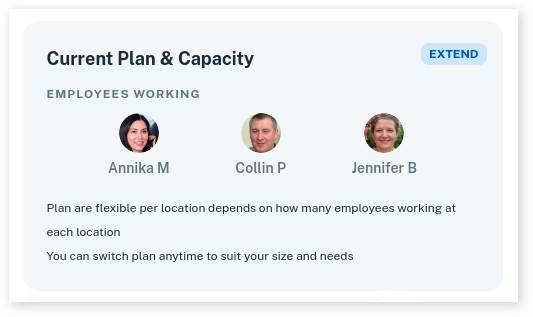
- Optional: If you need to Edit your Staff, Click Here
- Then select the New Tier to upgrade the Location
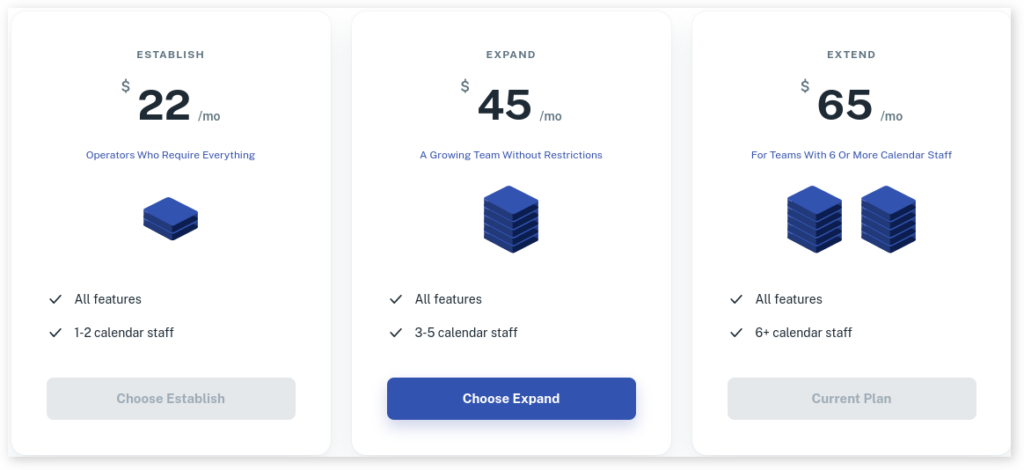
- Press Save to confirm the uppdate.
Note: You can only downgrade to a smaller plan if your current working staff doesn’t exceed the limit of that plan. For example: if you have 3 people working at a location, you cannot downgrade to Establish, as Establish has a limit of 2 staff.