
To help relieve some of the pressure, there is an option in the Client Diary online bookings settings that enables your customer’s online bookings to be auto approved on your Client Diary Calendar instead of you manually doing it yourself.
To do this:
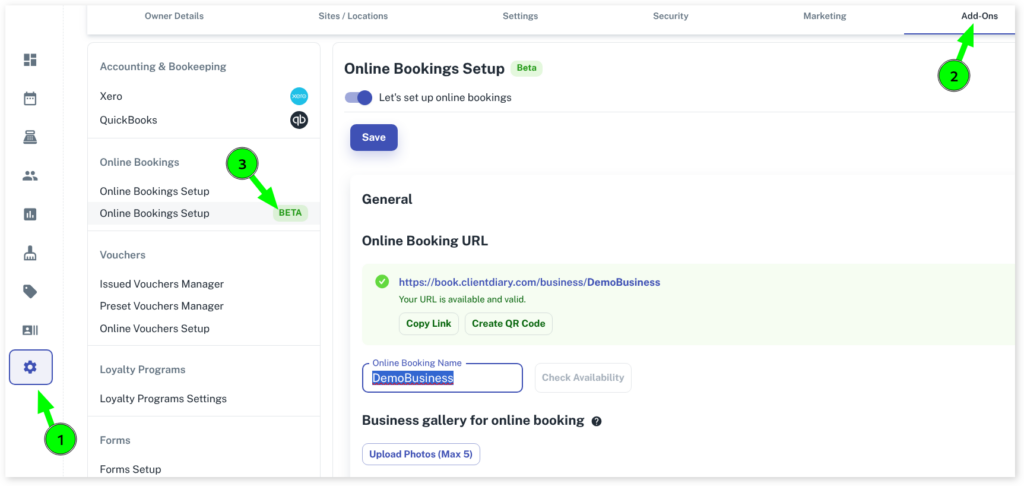
- Select the My Account menu
- Click on Add-Ons
- Press Online Bookings Setup Beta
- Scroll down to Other and click on the drop-down
- Scroll down to Auto-approve bookings
- Click on the toggle to change to Yes
- Select Save to apply settings
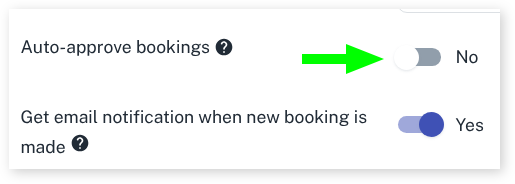
This will now auto approve all future online bookings that your clients make in your Client Diary Calendar.
Note: When an auto approved online booking appointment comes through to your Client Diary Calendar, you will not get an online booking notification, as the appointment will look like a normal booking in your Calendar. You will still receive the email notification when someone makes an online booking.